Product Update
Product Updates: April 2026


Varun Sridhar
As we kick off Q2 2026, we're doubling down on the operational backbone that makes Gynger a true accounts receivable platform — not just a payments tool. This month, we shipped a full collections lifecycle that automates payment recovery end-to-end, and a new Communications hub that gives vendors complete visibility over every email sent to their buyers.
Collections & Payment Recovery: From Overdue to Resolved, Automatically
What is it?
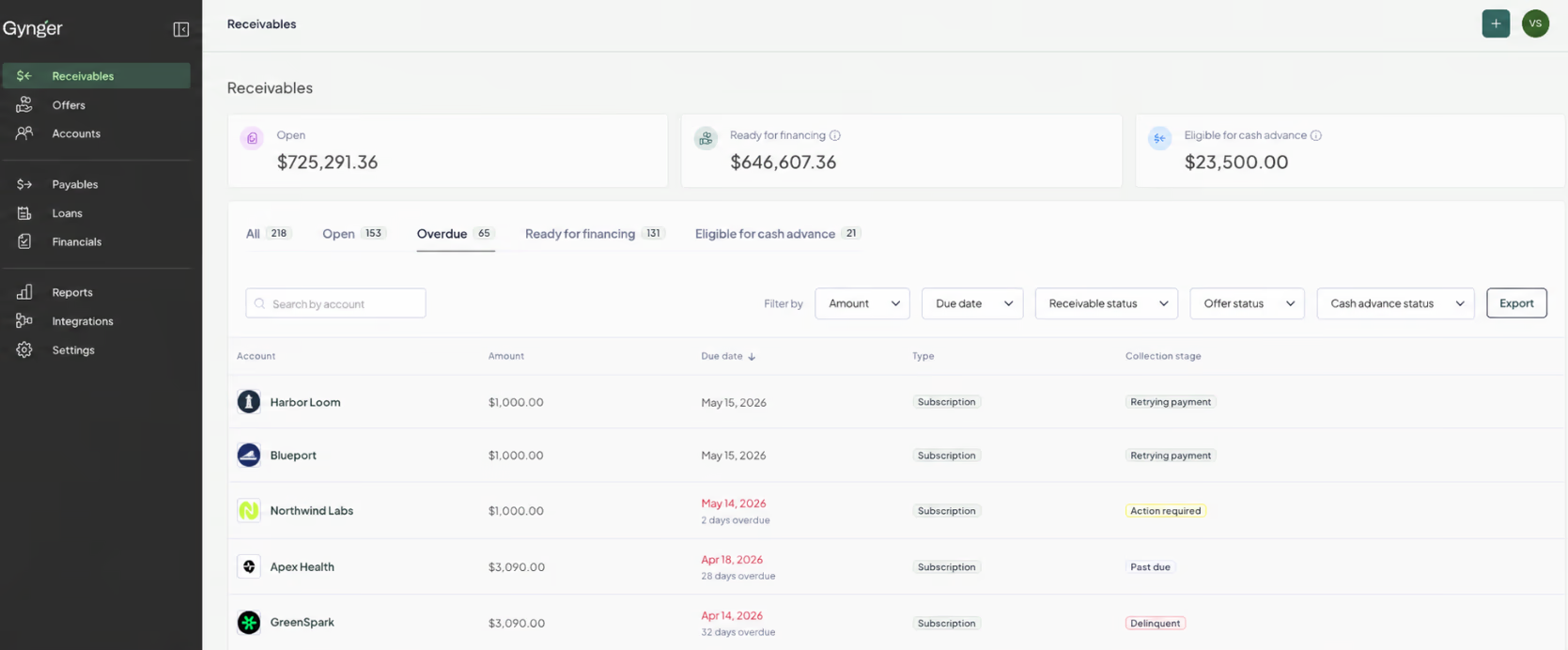
Gynger now includes a built-in collections workflow that tracks, escalates, and recovers overdue payments without requiring vendors to manage the process manually. Every receivable in Gynger now carries a Collections Stage that reflects its real-time payment health: Current, Action Required, Past due, or Delinquent.
The AR dashboard now includes a dedicated Overdue tab that surfaces every receivable past its due date, along with a "Days Overdue" column so finance teams can instantly prioritize by urgency. Vendors can also manually transition a receivable's collections stage when real-world actions happen outside of Gynger — like receiving an offline payment or escalating an account.
When a buyer payment fails, Gynger automatically evaluates the rejection reason and determines whether a retry is safe. If it is, the system retries on an intelligent schedule, notifying the buyer at each step with clear guidance on what happened and what to do next. If the failure requires action — like updating a payment method — Gynger sends targeted recovery emails prompting them to resolve the issue before the next attempt.
This isn't a single feature — it's a full system: automated retries, customer-facing recovery emails, vendor-facing overdue visibility, and manual override controls, all working together.
How does it work?
When a payment fails, Gynger evaluates the rejection code and determines whether an automatic retry is appropriate.
If retryable, the system schedules follow-up attempts and sends the buyer payment reminder emails at each stage.
If payment is not retryable, or automated retries have been exhausted, Gynger sends an email requesting the customer to update their payment method immediately to avoid going overdue.
The receivable's Collections Stage updates automatically as it moves through the recovery lifecycle.
Vendors can monitor all overdue receivables from the new Overdue tab on the AR dashboard, sorted by days overdue.
Why is it helpful?
Recover revenue without lifting a finger: Automated retries and buyer notifications handle the most common payment failure scenarios, recovering overdue payments before they require manual intervention.
Prioritize what matters: The Overdue tab and days-overdue visibility let your finance team focus on the accounts that need attention most, instead of scanning the full receivables list.
Stay in control: Manual stage transitions mean your AR records always reflect reality, even when payments are resolved through conversations or processes outside of Gynger.
Communications Hub: See and Control Every Email Sent on Your Behalf
What is it?
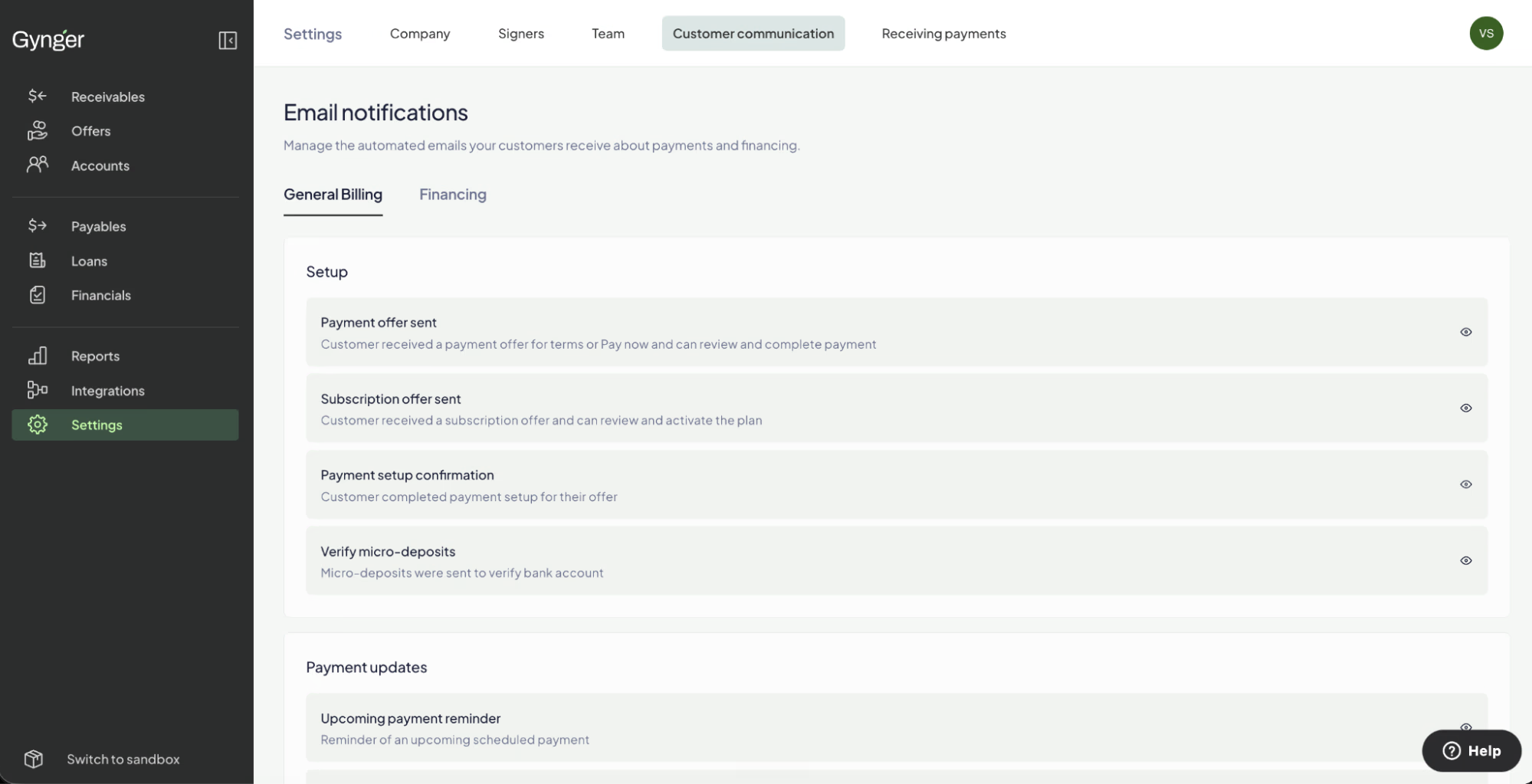
Vendors now have a centralized Communications tab within their Gynger configuration where they can view every buyer-facing email that Gynger sends on their behalf. The tab is organized into two sections — General Billing and Financing — covering the full spectrum of automated communications across the offer lifecycle.
Each email is displayed as a card showing its name, trigger event, and a description of when it fires. Vendors can see exactly what their buyers receive at every stage: payment confirmations, upcoming payment reminders, subscription lifecycle updates, credit approval notifications, loan payment receipts, and now, the full set of payment recovery and collections emails introduced alongside the new collections workflow.
This gives vendors something they've never had before in Gynger: a single place to understand the complete communication journey their buyers experience, from the first billing notification through payment recovery.
How does it work?
Navigate to Settings → Customer Communication in the Gynger App
Browse two sub-tabs: General Billing (payment confirmations, reminders, subscription updates) and Financing (credit approvals, loan setup, loan payment emails).
Each email card shows the email name, the event that triggers it, and a preview of the email.
Review the full set of emails to understand what your buyers see at every stage of their payment journey.
Why is it helpful?
Full transparency: Know exactly what your buyers are receiving at every step — no more guessing what automated emails look like or when they fire.
Confidence in your brand experience (Coming soon): The ability to customize what is sent as well as the language and tone of the emails to ensure the buyer experience aligns with how you want your company represented.
Our team is here to walk you through these updates and show you how Gynger can streamline your billing operations, accelerate deal flow, and improve cash flow visibility. Schedule a call with our team to learn more.
Join our newsletter to get monthly insights and updates
Next up


FAQ
Frequently Asked Questions
What is a credit program?
It's the option for your customers to pay over time, offered under your own brand. You get paid upfront, your customer pays in installments, and Gynger runs the financing behind it.