Product Update
Product Updates: March 2026


Varun Sridhar
As Q1 2026 comes to a close, we're shipping features that give vendors more ways to offer Gynger to their customers and more control over deal economics. This month's updates center on two themes: adding a direct email channel for offer delivery that brings Gynger closer to a complete invoicing workflow, and giving vendors a new lever to influence financing costs.
Send Offers via Email: Meet Your Customers in Their Inbox
What is it?
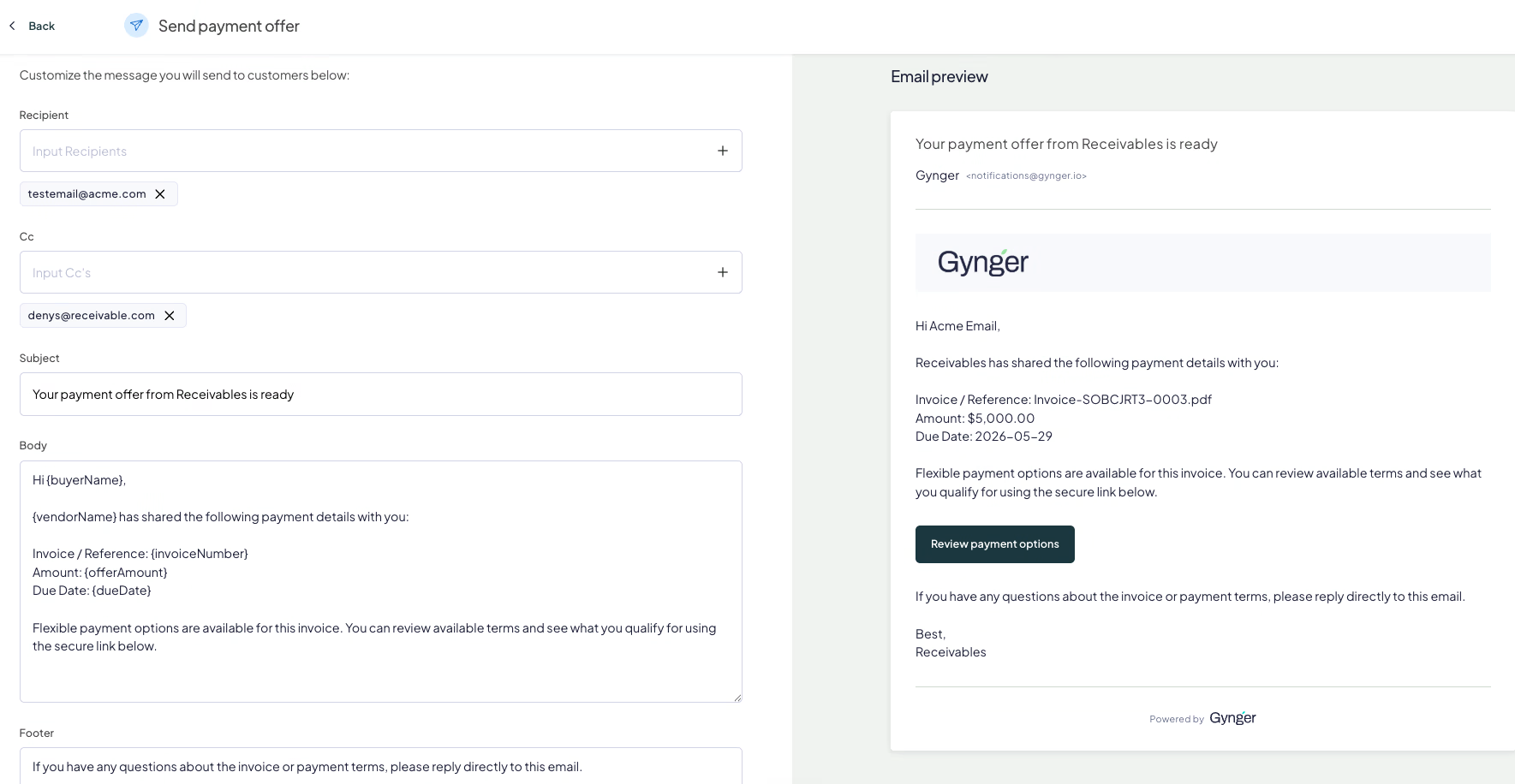
Vendors can now send payment offers directly to their customers via email, right from the Gynger app. Until now, sharing an offer meant copying a link or downloading a PDF to send via email manually or integrating with the Gynger API. With email delivery, Gynger becomes a more complete part of the invoicing and collections workflow — vendors can compose, preview, and send a branded payment email in one step, for any offer type: Pay Now, Vendor Terms, Subscriptions, or Gynger Financing.
The email includes a customizable subject line and body, an embedded payment link as the primary call-to-action, and any attached invoices or receivables. A live preview updates dynamically as you edit, so you know exactly what your customer will see before you hit send. Delivery is handled through SendGrid, with automatic retry logic.
How does it work?
Create an offer in the Gynger App as usual
After creation, select "Send email" from the sharing options
Add recipient email(s), optional CC addresses
Review the live preview to confirm the look and feel
(Optional) You can change the subject line, and even the email body
Click send — the email is delivered with the payment link embedded as a CTA
Why is it helpful?
Faster collections: Getting an offer into a customer's inbox immediately — with a one-click payment link — reduces the time between offer creation and payment setup.
Professional, branded communication: Customizable email content lets your team communicate in your voice, while Gynger handles delivery and tracking behind the scenes.
End-to-end workflow: No more switching between Gynger for offer creation and your email client for delivery. Create, send, and track from one place.
Vendor Fee Controls: A New Pricing Lever for Financing Offers
What is it?
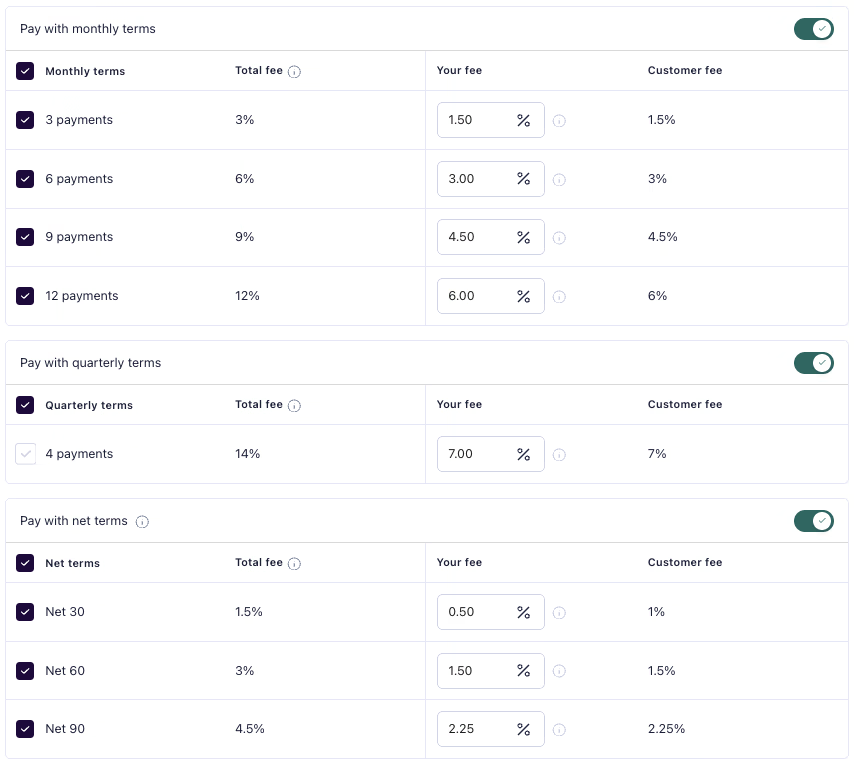
Vendor Fee Controls give technology vendors the ability to directly influence the cost of financing for their customers. When creating payment templates for financing, vendors can now choose how much of the total financing fee they absorb versus how much is passed through to the buyer.
Previously, vendors could apply a subsidy as a percentage-of-a-percentage, a model that was difficult to reason about and lacked granularity. The new Vendor Fee model replaces this with a simple, absolute percentage: vendors see the total fee for each term, set their own contribution, and the customer's fee adjusts automatically. If a 12-month term carries a 12% total fee and the vendor takes on 10%, the customer pays just 2%. It's that straightforward.
Each vendor has a pre-configured minimum fee floor, ensuring pricing stays within agreed-upon bounds. Validations prevent fees from going below the minimum or above the point where the customer fee would drop below zero.
How does it work?
Navigate to the Gynger App to Offers -> Templates and create a payment template or update your existing payment template.
For each payment term option, you'll see three fields: Total fee, Vendor fee (editable), and Customer fee
Adjust your Vendor fee up or down — the Customer fee recalculates in real time.
Validations ensure you stay within your configured minimum and the term's maximum.
Once configured, use this template across all your offers.
You can create different templates with custom pricing for different customer segments, all the control is in your hands.
Why is it helpful?
Win more deals: Absorbing part of the financing fee lets you offer more competitive terms to strategic accounts without changing your pricing structure.
Simple, transparent economics: An absolute percentage fee is easier to understand and communicate than a percentage-of-a-percentage subsidy.
Flexible by default: Control fee splits differently on different templates, giving you the ability to tailor pricing across your portfolio.
Ready to put these updates to work? Log in to your Gynger account or schedule a call with our team to learn more.
Join our newsletter to get monthly insights and updates
Next up


FAQ
Frequently Asked Questions
What is a credit program?
It's the option for your customers to pay over time, offered under your own brand. You get paid upfront, your customer pays in installments, and Gynger runs the financing behind it.